
Design automation for electrical engineers
One-lines. Panel schedules. Calculations.Sized and generated in seconds.
No credit card required for trial · Cancel anytime
The problem
The tedious part of electrical design shouldn’t take this long.
Drawing the one-line by hand, sizing every breaker and conductor, building schedules cell by cell. Change a single load and it all cascades. It is slow, repetitive, and exactly where mistakes slip in.
Features
Deliver your design, instantly.
Everything your construction package needs, generated from your loads and delivered in the formats you already use. Enter your design by hand or upload an Excel sheet, and SparkBooksPro does the rest.
Input (by hand or Excel upload)GenerateExport (DXF, Excel, PDF)
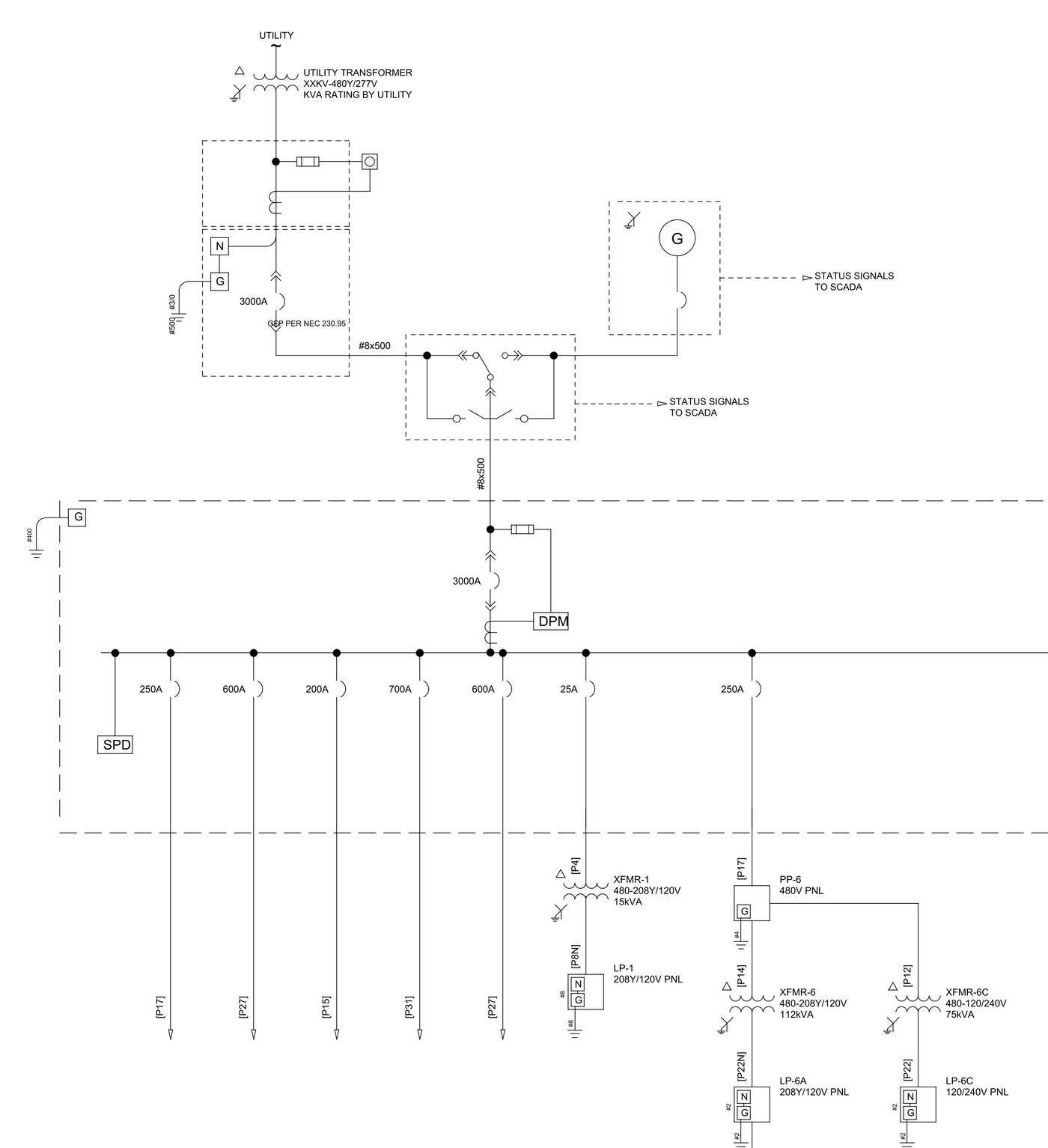
One-Line Diagrams
A complete, editable single-line: sized, formatted, and ready to drop into your set.
- Automatic distribution equipment, breaker, and conductor sizing
- Editable DXF that opens in AutoCAD and exports to PDF
- Custom symbols and formatting to match your company standards
- Custom sheet sizes for any project
- Always in sync with design changes, so no manual CAD edits
- Clean, professional layouts, compliant with NEC 2023
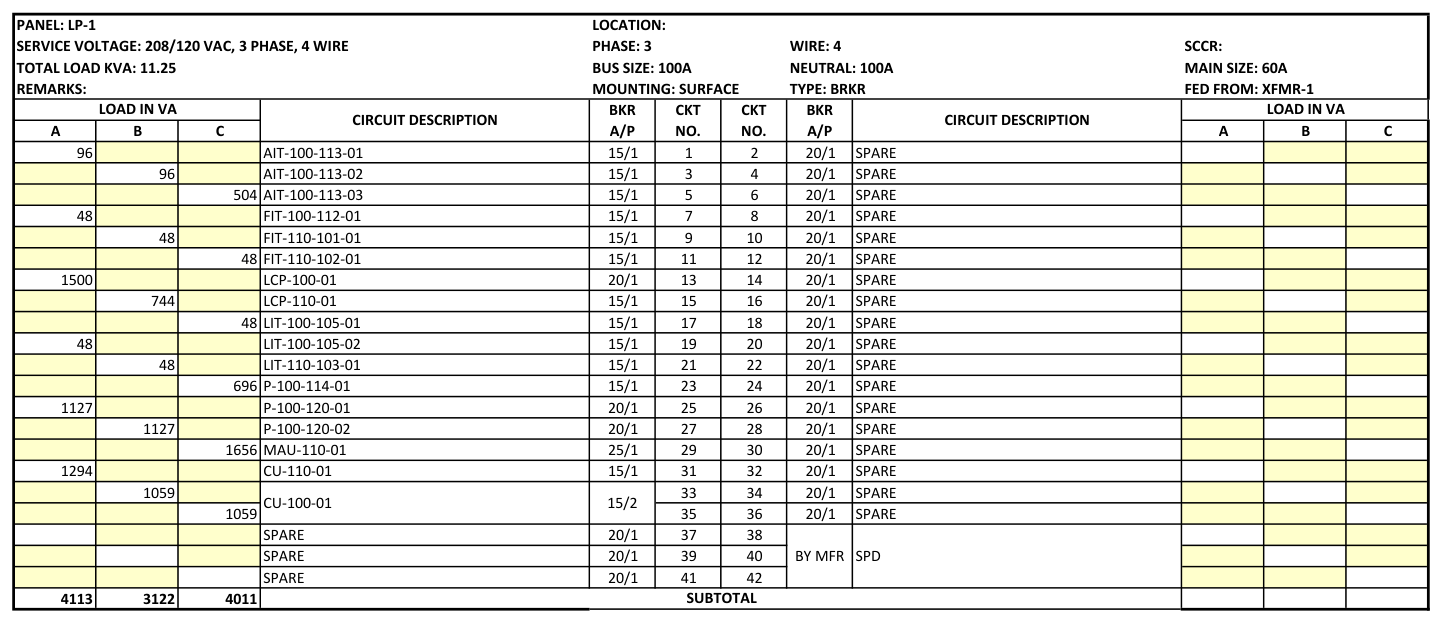
Panelboard Schedules
Complete panel schedules in Excel, built for you.
- Fully built schedules in Excel, easy to edit and share
- Automatic breaker sizing and panel KVA / amp load
- Circuit descriptions, phase loading, and totals included
- No more building schedules one cell at a time
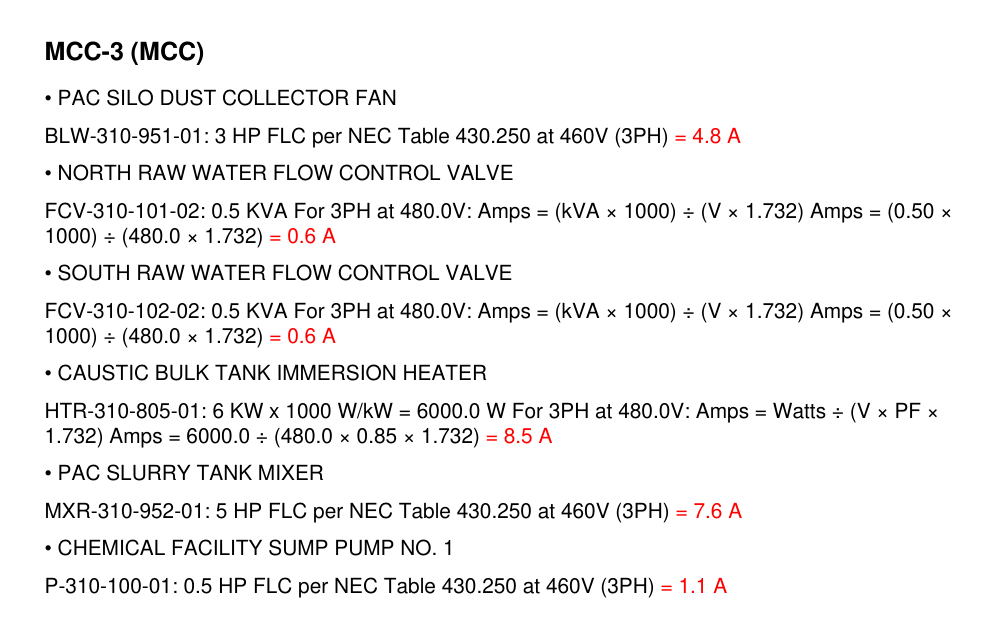
Calculation Report
Every number shown, so you can stamp with confidence.
- Every calculation written out step by step: conductor, breaker, and transformer sizing
- Verify each result against NEC 2023 before you seal
- No black box: full transparency for your QA and your seal
- Delivered as a clean, shareable PDF
Pricing
Simple pricing. Start free.
Free for 30 days, then $199/month per user, or $1,990 for annual subscriptions.
Professional
$1,990 for annual subscriptions
- Create unlimited projects
- Unlimited changes to projects
- Unlimited calculations and reports
- Stores project data indefinitely
- Multiple users can edit the same project
- Excellent for multi-disciplinary teams
- Project updates are sent to all members instantly
- Priority support
Enterprise
- Invite your team by email and assign named seats
- An easy-to-use admin dashboard to manage your company’s enterprise account, seats, and invites
- Centralized billing
- Priority onboarding and support
- Custom one-line symbols and panelboard schedule format to match your existing company standards
FAQ
Frequently asked questions
Does SparkBooksPro replace SKM or ETAP?
No. Those are power-system analysis tools, and you should keep using them. SparkBooksPro automates the production of your one-line, panelboard schedules, and supporting calculations for the construction package.
What files does it produce?
It produces an editable DXF one-line (opens in AutoCAD), Excel panelboard schedules, and a PDF report documenting every calculation.
Can I verify the calculations?
Yes. Every calculation is written out in full in the PDF report, so you can check the math and confirm compliance before you stamp. Calculations follow NEC 2023.
Can I edit the outputs?
Yes. The one-line is a standard DXF you can edit in AutoCAD, and the schedules are standard Excel files.
Do I need to install anything?
No. SparkBooksPro runs in your browser. Your outputs are standard DXF, Excel, and PDF files you download and use in the tools you already have.
From loads to a stamp-ready package.
Your load information is the only input. SparkBooksPro sizes the system, draws the one-line, and documents every calculation. You review and seal.